
3D Character Design Process: 6 Essential Steps for Beginners
Getting started with 3D character design process is super exciting but can feel a bit overwhelming at first. If you’re new to the game, it’s important to know the key steps involved in bringing a character to life.
This guide breaks down six essential stages that every beginner should know. Whether you’re aiming to create characters for games, animations, or just for fun, these basics will help you build awesome and realistic 3D characters.
3D Character Design Process

Step 1: Concept Art
Creating concept art is a critical first step in the 3D character design process.
This phase involves conceptualization, where artists craft representations of the character, detailing its appearance, variations, posture, clothing, and overall style. This step is essential as it lays the foundation for the entire modeling process.
Concept artists must possess sharp creative skills to effectively translate the client’s requirements from descriptive features into visual representations. They must envision how the character will look, considering various aspects such as colors, contours, and shapes.
This requires a keen understanding of aesthetics and a strong ability to visualize abstract concepts.
>>>Read more: How to Sell 3D Assets Online: Full Guide to Sell Your 3D Model
Step 2: 3D Character Modeling
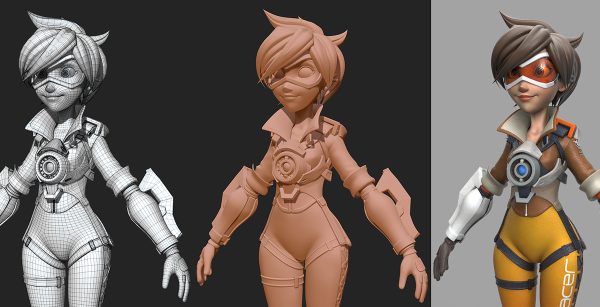
After creating the concept art, the next step in 3D character design is modeling. This process turns the 2D blueprint into a 3D character with depth and realism.
To do this, artists use special software tools to shape and sculpt the character, focusing on its anatomy, features, and expressions.
The modeling process has several key stages:
- Blocking: This is the first stage where the artist uses simple shapes to outline the character’s basic form.
- Sculpting: Here, the artist adds detailed features, like muscles and facial details, to make the character look more realistic.
- Retopology: This step involves adjusting the character’s structure to ensure it moves smoothly during animation.
- UV Mapping: The artist maps 2D textures onto the character’s 3D surface, making sure the textures look correct.
- Baking: High-resolution details are transferred to a simpler model to improve performance without losing quality.
- Texturing: Finally, the character is colored and textured to enhance its appearance.
This step-by-step process helps create a character that looks great and can be animated easily.
>>>Read more: 7 best 3D model marketplaces and platforms to sell your 3D models on the internet
Step 3: Texturing

Texturing is a vital step in the 3D character design process, where artists give the character its final look by adding colors, textures, and surface details.
This phase usually happens before rigging and skinning, as it sets the character’s appearance and makes it look more realistic. Texturing involves applying bitmaps, which are images, to the character’s unpainted surface.
These bitmaps add color, volume, and the illusion of depth, making the character appear lifelike.
There are two main types of texturing used in 3D character design:
- Relief Texturing: This method adds depth and detail to the character’s surface, giving it a tactile, realistic appearance. It includes techniques like bump mapping, normal mapping, and parallax occlusion mapping. Relief texturing is often used to enhance the visual appeal of characters, environments, and objects.
- MIP Mapping: This technique optimizes texture quality by using different resolutions of the texture map based on the character’s distance from the camera. It helps in balancing texture detail and performance, especially in games where characters move closer or farther from the viewer.
The main goal of texturing is to simulate how light interacts with the character’s surface, adding effects like light, shadow, and reflection. This makes the character look more realistic and visually appealing.
Once texturing is complete, the character model is considered finished. However, if the character needs to be animated, rigging and skinning will be the next steps.
Artists use various tools for texturing, such as Substance Painter, Substance Designer, and 3D Coat. These tools allow for precise control over the textures and details applied to the character, ensuring a polished and professional result.
>>>Read more: Texturing and Shading: Techniques for Realistic 3D Modeling
Step 4: Character Rigging & Skinning

Character rigging and skinning are essential steps in the 3D character design process that bring the character to life by enabling movement.
Character Rigging
Rigging involves creating a virtual skeleton for the 3D character. This skeleton, known as a rig, consists of bones that correspond to the character’s body structure.
The rig allows the character to move realistically by integrating these bones with key points of the body. The rig can range from 20 to 100 bones, depending on the complexity needed for realistic movement.
However, the more bones a rig has, the harder it is to manually control things like angles and textures. To manage this complexity, artists often use specialized tools that help create a realistic rig efficiently.
Skinning
Skinning comes after rigging and involves binding the character’s skin, or outer mesh, to the rig. This process allows the character’s skin to move naturally with the underlying bones.
During skinning, each vertex of the character’s mesh is influenced by one or more bones. The degree of influence is determined by weights, which control how much a particular bone affects a part of the mesh.
Proper skinning is crucial for smooth animation, as it ensures that the character’s movements look natural and lifelike.
Software tools like Blender and Maya are commonly used to handle rigging and skinning. These tools offer advanced rigging systems that help artists achieve the desired results.
Once rigging and skinning are completed, the character is fully prepared for animation, ready to move and interact realistically in a digital environment.
Step 5: Animation
After completing rigging and skinning, the next step in the 3D character design process is animation. This is where the character’s movements are created by manipulating the rig controls.
Animation involves displaying a series of static images in sequence, which gives the illusion of movement.
Animators use keyframes to define specific poses and movements of the character over time. These keyframes are like snapshots of the character’s position at different moments, and when played in sequence, they bring the character to life.
Through this process, the character can move, express emotions, and interact with its environment.
To make the animation more realistic, animators adjust timing, spacing, and easing. Timing refers to the speed of the movement, spacing deals with the distance between keyframes, and easing smooths out transitions between movements.
By fine-tuning these elements, animators can create natural and convincing motions that enhance the character’s believability and engagement with the audience.
Step 6: Porting Into the Game Engine
Once a 3D model is fully prepared, the next step in the 3D character design process is to port it into a game engine.
Game engines are specialized frameworks used for developing games. They come with internal libraries and tools that allow you to integrate your 3D models into the game environment smoothly.
Popular game engines like Unity, Unreal Engine, Gamemaker, Defold, and CryEngine offer a wide range of capabilities for this purpose.
Each of these engines provides the necessary tools to bring your 3D character into the game world, allowing it to interact with the environment, respond to player inputs, and behave according to the game’s design.
Porting the model into a game engine involves importing the 3D assets, setting up materials, textures, and animations, and configuring how the character interacts with the game’s physics and logic.
This step is crucial because it ensures that the character functions correctly within the game, maintaining the quality and detail achieved during the design process.
Industry Trends in 3D Character Design

The world of 3D character modeling is changing fast. One big trend is the rise of stylized characters.
Instead of just making characters look realistic, artists are now creating more unique and imaginative designs. This allows for greater creativity and more interesting characters.
Another trend is the use of procedural generation. This technique uses algorithms to automatically create characters. It helps designers work faster and explore different character variations more easily.
AI-driven tools are also making a big impact. These tools help with tasks like facial expressions, motion capture, and even giving characters personality.
By using AI, the design process becomes easier and more efficient. This makes 3D character design more accessible to a wider range of artists.
Overall, these trends are pushing 3D character design to new levels, making it more creative, efficient, and inclusive.
What Is the Price of Creating a 3D Character for a Game?
The cost of creating a 3D game character can vary based on several factors. Key factors include the complexity of the character model, the number of hours needed for creation, the artist’s level of expertise, and the region where the artist is located.
For a typical 3D character, the process might involve around 20 hours for concept creation, 50 hours for modeling, and 15 hours for texturing and rigging.
Animation can take about five hours per second, so three seconds of animation would require roughly 15 hours. In total, creating and animating a character might take around 100 hours.
With an average hourly rate of $30 for a designer, the cost of creating and animating a 3D character can be approximately $3,000. For precise estimates tailored to specific needs, it’s best to consult a game art studio.
Conclusion
By following these six key steps, concepting, modeling, texturing, rigging, skinning, and animating, you’ll get a good handle on creating cool and realistic characters.
Keep playing around with these basics, and you’ll build up your skills in no time. So, have fun with your designs and watch your ideas come true!
Source: https://invogames.com/blog/3d-character-design-process/
–
Animost – Vietnam 3D Animation Studio


hello@animost.com

More from the stage
Dec 16, 2025Why Is My Blender Animation Pixelated? A Step-by-Step Fix Guide
Why is my Blender animation pixelated? We break down the real causes and show you how to fix pixelation step by step.
VFX Compositing: The Ultimate Beginner-Friendly Guide
Discover how VFX compositing works with this detailed, beginner-friendly guide. We break down keying, tracking, color correction, and more!
Start a project
Tell us what you need made.
Send us the details and we will come back within one business day with a scope and a price.
Start a project