
Full Body Motion Capture Guide: From Setup to Polished Animation
Ever wonder how those game characters or movie creatures move so realistically? That’s where full-body motion capture (mocap) comes in, and I’m here to guide you through it. Mocap is the magic behind lifelike animations in games, movies, VR, and more.
Whether you’re just getting started or looking to sharpen your skills, I’ll walk you through everything, from choosing the right gear and setting up your space to capturing smooth movements and polishing the final animations. By the end, you’ll be ready to bring your digital creations to life like a pro. Let’s dive in and make some magic together!
Understanding The Basics of Full-Body Motion Capture
Imagine capturing every nuance of a person’s movement and applying it to a digital character. That’s full-body motion capture in a nutshell. It’s a game-changer in creating realistic animations without the painstaking frame-by-frame process.

Two main types of full-body motion capture systems are optical systems and non-optical systems:
- Optical systems use multiple cameras to track reflective markers placed on a performer. They’re high precision, and great for detailed movements. But they need a controlled environment and can be pricey. Vicon, OptiTrack, and Qualisys are popular systems.
- Non-optical systems rely on sensors attached to the body, like inertial measurement units (IMUs), such as Xsens, Rokoko Smartsuit Pro, and Perception Neuron. They’re Portable and versatile; you can use them almost anywhere. However, they might not be as precise as optical systems.
Here’s how it works:
- Full-body motion capture starts with the performer wearing a suit fitted with markers or sensors to track their movements.
- The environment is carefully prepared, with cameras or sensors positioned for full coverage and the system calibrated for accuracy.
- As the performer acts out the desired movements, the system records in real-time, often allowing for live monitoring to address any issues.
- After the session, the raw data is cleaned to remove errors and smooth out movements.
- Finally, the refined data is mapped onto a digital skeleton, enabling realistic animations for characters in films, games, or virtual simulations.
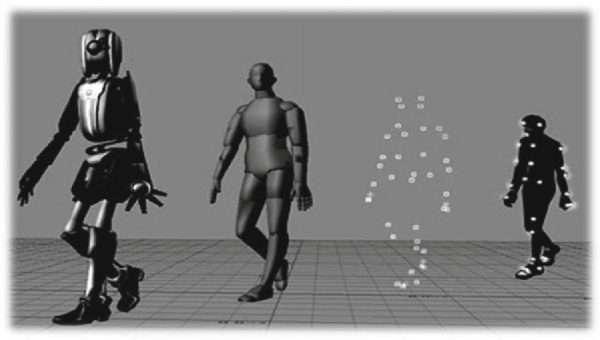
Mocap might sound technical, but once you get the basics, it’s pretty straightforward. By knowing how it works and the tools involved, you’ll be ready to dive into creating lifelike animations for your projects.
For more details about motion capture, check out this guide!
Full Body Motion Capture Guide
This guide will walk you through the entire process, covering everything from the equipment you need to the steps for capturing and refining full-body motion data.
Equipment & Tools Needed
Before you can start capturing motion, you’ll need to gather the right tools and set them up for success. Here’s what you’ll need:
| Category | Item | Purpose | Examples |
| Hardware | Motion Capture Suit | Tracks body movements with markers (optical) or sensors (non-optical). | Rokoko Smartsuit Pro, custom marker suits. |
| Cameras or Sensors | Records movement data (optical systems use cameras; non-optical use sensors). | Vicon, OptiTrack (optical); Xsens (sensors). | |
| Accessories | Supports setup and accuracy. | Tripods, calibration wands, extra markers. | |
| Computing Hardware | Processes and stores motion capture data. | High-performance PCs, external storage. | |
| Software | Capture Software | Collects and records raw motion data. | Cortex, MVN Analyze. |
| Animation Software | Processes and refines motion data for use in animations. | Autodesk MotionBuilder, Blender, Unreal Engine. | |
| File Management Tools | Organizes motion capture files and backups. | Cloud storage, local data organization. | |
| Optional Tools | Facial and Hand Capture Tools | Captures more detailed performance data for face and hands. | Faceware, Manus Gloves. |
| Lighting Equipment | Improves visibility of markers for optical systems. | Studio lights (diffused). |
This table gives you a clear idea of what you’ll need and how each piece fits into the motion capture workflow. Adjust your setup based on your project’s specific requirements and budget!
>>> Read more: Unlocking Motion Capture: How to Do Motion Capture without Suit?
Setting up for Motion Capture
Preparation is key to a successful mocap session. Follow these steps to ensure your setup is smooth and efficient:
Step 1: Choose the Right Environment
Space requirements:
- Large enough for performers to move freely.
- Minimal clutter to avoid interference.
Lighting:
- Optical systems: Avoid reflective surfaces and direct sunlight, as they can interfere with marker tracking.
- Non-optical systems: Lighting isn’t a concern, but ensure the area is well-lit for safety.
A good setup saves you from headaches later. A spacious, clean, and controlled environment means fewer issues and better mocap data.

>>>Read more: How to create your MetaHumans with motion capture
Step 2: Calibrate Your Equipment
Optical systems:
- Align cameras for maximum coverage of the capture area.
- Use calibration tools to synchronize cameras and define a 3D space.
Non-optical systems:
- Sync all sensors on the suit.
- Perform a quick sensor calibration by standing still in a T-pose.
Step 3: Prepare the Performer
- Properly fit the motion capture suit to ensure markers or sensors stay in place during movement.
- Place additional markers or sensors on specific joints if needed (e.g., fingers, toes).
- Ensure the performer is comfortable and ready to move.
Capturing Full Body Motion
Now that everything’s set up, it’s time to record the movement:
Step 1: Plan Storyboard Movements
- Define the actions you want to capture, like walking, running, or jumping.
- Break down complex sequences into smaller, manageable takes.
In this step, make sure the performer understands the movement and timing.
Step 2: Record the Performance
- Start the capture software and ensure all markers or sensors are visible.
- Performers should move naturally and fluidly to ensure realistic results.
- Monitor the session in real-time on the software to catch any issues, such as occluded markers or sensor drift.
Step 3: Troubleshoot in Real-Time
- Pause and recalibrate if markers get blocked or if sensors lose sync.
- Review takes after each session to ensure the data meets your expectations.
Processing & Refining Data
After you’ve captured your motion data, the next step is to clean it up and get it ready to use. This is where you take raw movements and turn them into polished animations that fit perfectly into your project. Here’s how you can do it step by step.
Step 1: Transfer Data
- Export raw motion data from the capture system to your computer.
- Use compatible file formats like BVH, FBX, or C3D to ensure seamless integration with animation software.
Step 2: Clean Up the Data
- Fix Noise: Remove jittery or inaccurate movements caused by marker occlusion or sensor drift.
- Fill Gaps: Use interpolation to fix gaps in motion data.
- Smooth Transitions: Adjust curves and transitions for fluid movement.
Step 3: Rigging & Retargeting
- Apply the motion data to a digital skeleton (rig).
- Retarget the motion to fit the proportions of your 3D character. For example, a performer’s data might need adjustments to fit a taller or shorter character.
Step 4: Add Enhancements
- Layer in details like hand or facial animations if needed.
- Combine motion capture with keyframe animation to add stylized elements.
Step 5: Export Final Data
- Export the cleaned and rigged animation to your desired format.
- Import the data into your game engine, animation software, or VFX pipeline.
If you want to learn more about motion capture gaming, check out this guide!
This is where the magic happens! Cleaning, refining, and polishing your motion capture data makes sure it looks professional and fits your project perfectly. A little extra effort here goes a long way toward making your animations look amazing!

Advantages & Limitations of Full Body Motion Capture
Full-body motion capture is an amazing tool for creating realistic animations, but like anything, it has its ups and downs. Here’s a quick rundown to help you figure out if it’s right for your project.
Advantages
- Realism: Captures natural movements, including subtle details, for lifelike animations.
- Efficiency: Speeds up animation workflows, especially for complex actions.
- Consistency: Delivers smooth, continuous motion data.
- Versatility: Used in films, gaming, VR, and research.
- Integration: Compatible with 3D software and game engines.
Limitations
- Cost: High-end systems can be expensive.
- Setup complexity: Requires precise calibration and controlled environments.
- Marker occlusion: Markers in optical systems can be blocked, causing data gaps.
- Sensor drift: Non-optical systems may lose accuracy over time, needing recalibration.
- Limited creativity: Captured motion may lack stylization and need manual adjustment.
- Environment dependency: Sensitive to lighting, reflective surfaces, or magnetic interference.
- Performer dependency: The quality depends on the actor’s skill.
Full-body motion capture is a seriously cool tool that can take your animations to the next level. But it’s not always the perfect fit for every project. Think about what you need:
If you’re after super realistic movement and want to save time, mocap is a game-changer. Just keep in mind the costs, setup hassles, and the right environment you’ll need to make it work.
On the other hand, if your project’s more stylized or cartoony, you might want to mix mocap with manual animation for the best of both worlds. Start small if you’re new to it. Try a simple setup first to get the hang of things before diving into big, complex scenes.
Expert Tips for Full-Body Motion Capture
If you want your motion capture sessions to be smooth and your results to look awesome, these tips are for you! Whether you’re just starting or already knee-deep in mocap, these insights will help you avoid headaches and level up your game.
- Prep like a pro: Pick a big, clear space without clutter or interference. Rehearse movements and make sure all markers or sensors are good to go. Planning saves tons of time!
- Nail your calibration: Always start with a T-pose and recalibrate often to keep everything accurate.
- Keep an eye on during capture: Watch the live feed for issues and grab a reference video while you’re at it. Smooth movements = better data.
- Clean it up: Use software tools to reduce noise and fix gaps. Make sure the skeleton fits your performer’s proportions.
- Troubleshoot smarter: Adjust camera angles or add markers for occlusion issues, and recalibrate if sensors act up.
- Go next-level: Blend mocap with keyframe animation, experiment with real-time setups, and stay updated with new tools.
And that’s it! Full-body motion capture is such a cool way to turn real-life movement into amazing, lifelike animations. I’ve walked you through the gear, the setup, the capturing process, and how to clean up the data, so now it’s your turn to dive in.
Whether you’re working on a game, a movie, or something for VR, mocap gives you the tools to bring your characters to life in ways you’ve never imagined. Don’t worry if it feels tricky at first because with practice, you’ll get the hang of it. So, let’s go make some magic together. Your characters are waiting!
This article draws upon information from dev.epicgames.com and other online resources. If you believe any content has been improperly attributed or requires correction, please contact us so we can address it promptly.
–
Animost – Vietnam 3D Animation Studio


hello@animost.com

More from the stage
Dec 16, 2025Why Is My Blender Animation Pixelated? A Step-by-Step Fix Guide
Why is my Blender animation pixelated? We break down the real causes and show you how to fix pixelation step by step.
VFX Compositing: The Ultimate Beginner-Friendly Guide
Discover how VFX compositing works with this detailed, beginner-friendly guide. We break down keying, tracking, color correction, and more!
Start a project
Tell us what you need made.
Send us the details and we will come back within one business day with a scope and a price.
Start a project