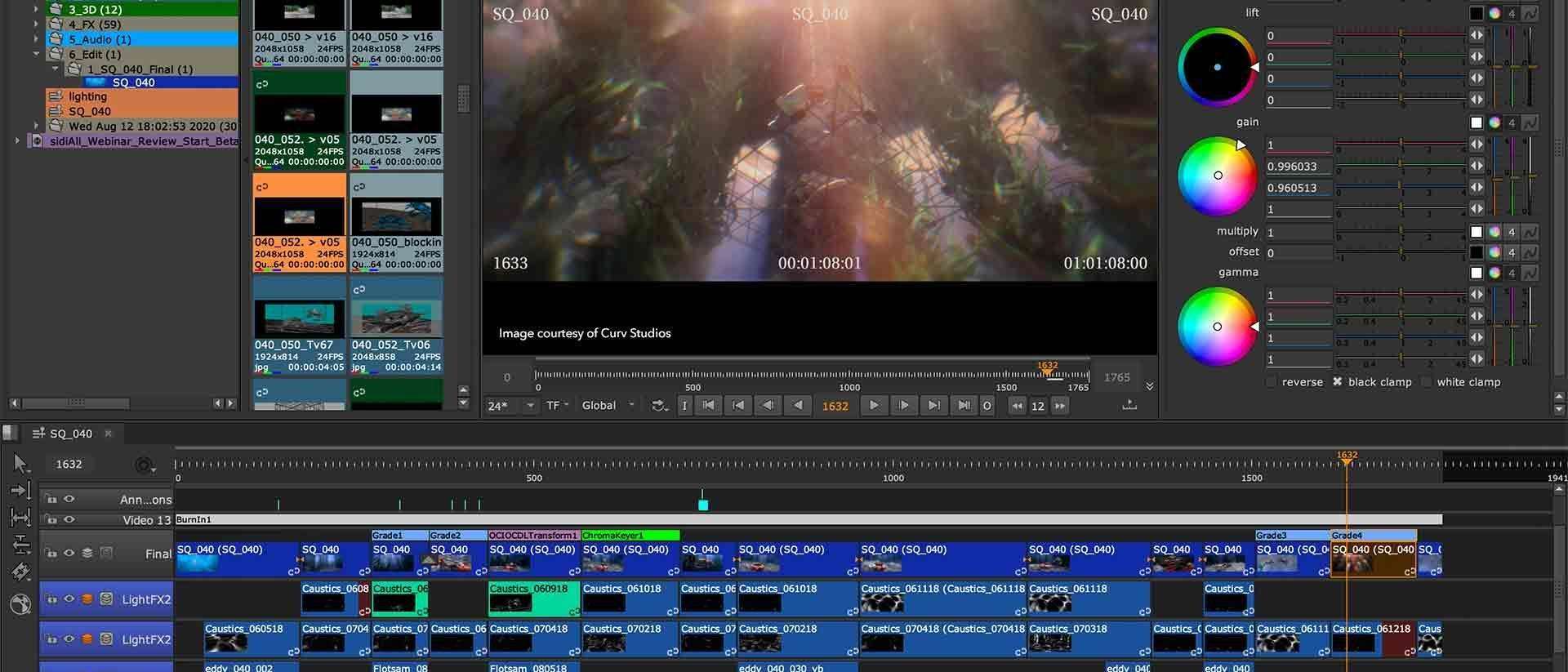
VFX Shot Tracking Software: The Backbone of A Smooth Post-Production
Working on a VFX project, whether it’s a short film, ad, or full-on blockbuster, can get messy real quick. You’ve got tons of shots, endless versions, and feedback flying in from every direction. That’s where VFX shot tracking software steps in to save your sanity. It keeps everything organized, keeps your team on the same page, and ensures your workflow runs smoothly.
In this guide, we’ll chat about what this software actually does, why it’s so important, the key features to look out for, and some of the best tools out there to make your VFX life way easier.
Why Shot Tracking Matters in VFX
Visual effects production is chaotic by nature. You’ve got animation, compositing, lighting, simulation, and sometimes multiple studios working across time zones. Without a proper tracking system, it’s easy to lose track of what’s done, what’s pending, and what’s falling behind.

Here’s why having good VFX shot tracking software is a total game-changer:
Keeps Everything Organized
Each shot in a film can have multiple versions and sub-tasks (like rotoscoping, matchmoving, and comp). Shot tracking software helps you see exactly where each task stands without digging through endless emails or folders.
>>> Read more: FX and animation studios increasing favor for virtual production and workstations
Improves Communication
Instead of using ten different chat threads or email chains, everyone can leave notes, attach images or videos, and comment directly on the shot. It keeps conversations focused and transparent.
Saves Time and Reduces Errors
When you have a centralized system, you avoid duplicate work and missed deadlines. The software ensures everyone is working on the latest version, and that feedback doesn’t get lost in translation.
>>> Read more: How Do VFX Artists Use CGI in Their Work? Expert’s Share
Enhances Collaboration
VFX work rarely happens in isolation. Teams across animation, compositing, and effects can all work together smoothly when tasks are clearly assigned and updates are visible in real time.
Makes Client Feedback Easier
Clients can log in, review shots, and leave notes directly on the platform. No more downloading huge video files or trying to interpret vague feedback like “can you make it pop more?”
>>> Read more: VFX vs. CGI Full Comparison: Which Is For Your 3D Project?
Key Features to Look for in VFX Shot Tracking Software
Not all tracking tools are built the same. Some are designed for small teams and freelancers, while others are made for large studios with hundreds of artists. When you’re picking one, here are the must-have features you should keep an eye on:
Shot and Asset Management
You should be able to easily create, organize, and manage all your shots and assets. The software should show a clear visual overview, what’s in progress, approved, or waiting for review.

Version Control
This is crucial. You’ll want to keep track of multiple iterations of the same shot, know which one is the latest, and have the ability to revert or compare versions if needed.
Task Assignment and Scheduling
Good software lets supervisors assign tasks to specific artists, set deadlines, and automatically notify team members of updates or changes.
Review and Approval Tools
You should be able to review shots right inside the app: scrub through frames, add comments, draw annotations, and approve or reject submissions without using extra tools.
Customizable Dashboards
Every studio’s workflow is different. Having customizable dashboards means you can tailor the interface to show exactly what’s relevant to your role, whether you’re an artist, producer, or supervisor.
Integration with DCC Tools
The best VFX shot tracking software integrates with popular digital content creation (DCC) tools like Maya, Nuke, Houdini, Blender, or After Effects. This allows for seamless version uploads and progress updates straight from your working environment.
Cloud Collaboration
Remote work is now the norm. Cloud-based systems make it easy for teams across different countries to collaborate in real time without slow file transfers or outdated spreadsheets.
Reporting and Analytics
Producers love data. The ability to generate productivity reports, render status, or budget usage helps keep projects on track and clients informed.

The Top VFX Shot Tracking Software in 2025
Alright, now let’s talk about the actual tools. The VFX world has several great options depending on your needs, budget, and team size. Here are some of the most popular and powerful VFX shot tracking software solutions used by studios worldwide:
ShotGrid (formerly Shotgun)
If you’ve worked in a professional VFX or animation studio, you’ve probably heard of ShotGrid by Autodesk. It’s practically the industry standard.
Why we love it:
- Deep integration with Maya, Nuke, Houdini, and Unreal Engine.
- Extremely flexible with custom pipelines and automation options.
- Great for large teams and complex projects.
Best for: Mid to large studios that need a powerful, all-in-one production management system.
ftrack Studio
Another powerhouse, ftrack Studio offers a clean, user-friendly interface and strong collaboration tools. It’s designed for production tracking, review, and asset management.
Why we love it:
- Intuitive UI that’s easier to learn than some of the bigger tools.
- Built-in review player with annotation features.
- Excellent client review integration (through ftrack Review).
Best for: Studios looking for a balance between simplicity and professional-level control.
Kitsu
Kitsu is an open-source production tracking tool that’s gaining popularity among smaller teams and indie studios. It’s lightweight, web-based, and surprisingly powerful for its price (which can be free if you host it yourself).

Why we love it:
- Affordable and open-source.
- Easy to set up and use.
- Great for small to mid-size teams who don’t need every enterprise feature.
Best for: Indie creators, small studios, or educational teams.
NIM Studio
NIM combines project tracking, bidding, and review into one cohesive platform. It’s perfect for studios that want both creative and business management in one place.
Why we love it:
- Unique mix of production tracking and financial tools.
- Customizable interface.
- Great integration with creative apps.
Best for: Studios juggling multiple clients and needing both creative and business oversight.
Tactic by Southpaw Technology
Tactic is a flexible, open-source platform that many studios customize heavily to fit their pipelines. It’s especially known for its robust asset and workflow management capabilities.
Why we love it:
- Extremely customizable for tech-savvy studios.
- Scalable and secure.
- Supports integration with proprietary tools.
Best for: Studios with technical teams that can maintain and customize open-source systems.
Cloud vs. On-Premise: Which One’s Better?
One question we often hear is: Should you use cloud-based VFX shot tracking software or on-premise systems?
Let’s break it down:
Cloud-Based
- Easier to set up and maintain, no servers required.
- Perfect for remote or hybrid teams.
- Subscription-based pricing (good for flexible scaling).
On-Premise
- Offers more control and data security.
- Better for large studios with internal IT teams.
- Higher upfront cost but lower long-term subscription fees.
In 2025, most modern VFX studios are leaning toward cloud-based systems for convenience and collaboration, especially with remote artists now being the norm.

How to Choose the Right VFX Shot Tracking Software
So, how do you pick the right one for your team? Here’s a quick checklist to help you decide:
- Team Size and Budget: If you’re a small team, you don’t need enterprise-level tools. Kitsu or ftrack might be more cost-effective.
- Pipeline Complexity: For bigger studios with multiple DCC tools and complex workflows, ShotGrid or Tactic are great choices.
- Remote Collaboration Needs: Choose a cloud-based tool if you have remote artists or external partners.
- Ease of Use: Look for an interface your artists can actually enjoy using daily.
- Integration: Make sure it works smoothly with your preferred software (Maya, Nuke, Blender, etc.).
The Future of VFX Shot Tracking Software
The next generation of VFX tracking tools is looking even more exciting. We’re seeing more AI-powered features, automated task assignment, and real-time integration with render farms. Imagine a system that automatically predicts project bottlenecks or adjusts timelines based on artist performance; that’s where the industry is headed.
Another big trend is integration with virtual production tools. As more studios combine real-time engines like Unreal with traditional VFX, tracking software will become even more essential in keeping everything aligned between live and digital elements.
Final Thoughts
If you’re serious about streamlining your VFX pipeline, investing in good VFX shot tracking software is a must. It’s not just about managing tasks; it’s about giving your team the clarity and structure they need to do their best creative work.
We’ve seen how the right tool can transform a chaotic production into a well-oiled machine. Whether you’re working on a Netflix series, an indie short, or a commercial campaign, keeping your shots organized, tracked, and reviewed efficiently will always pay off in the long run.
Take your time, explore the options, and choose the software that best fits your workflow. Your future self and your post-production team will thank you for it.
–
Animost – Vietnam 3D Animation Studio


hello@animost.com

More from the stage
Sep 15, 2026Behind the Scenes of HOPE Na Hong-jin Sci-Fi Action with Motion Capture
If you love wild action movies, high-stakes science fiction, and cinema that keeps your heart pounding, South Korean filmmaker Na Hong-jin’s latest project, HOPE, needs to…
Do I Own the Copyright to AI-Generated Animation?
Do you own the copyright to AI-generated animation? Learn how AI, human creativity, and platform rules affect ownership and commercial rights.
Start a project
Tell us what you need made.
Send us the details and we will come back within one business day with a scope and a price.
Start a project