What is The Difference Between Xsens and OptiTrack?
What is the difference between Xsens and OptiTrack? While Xsens is known for its wearable, camera-free setup that’s perfect for mobile shoots, OptiTrack delivers studio-level precision using cameras and markers. In this guide, we’ll break down the key differences in setup, accuracy, pricing, and use cases so you can pick the system that fits your workflow best.
What is The Difference Between Xsens and OptiTrack?
Xsens is great if you need something quick and portable; it uses sensors in a suit, so no cameras are needed. OptiTrack’s more of a studio setup with cameras and markers, but it’s super accurate. Go with Xsens for flexibility, or OptiTrack if you want top-notch precision in a controlled space.
| Feature | Xsens | OptiTrack |
| Capture Type | Inertial (IMU-based) | Optical (camera-based) |
| Portability | High | Low |
| Setup Time | Quick | Time-consuming |
| Environment Needed | Flexible | Controlled studio |
| Accuracy | High (can drift) | Extremely high |
| Cost | Moderate to high | Varies (scales with setup) |
| Best For | Mobile, VR, games, sports | Studio films, biomechanics |
Xsens and OptiTrack Hardware & Setup
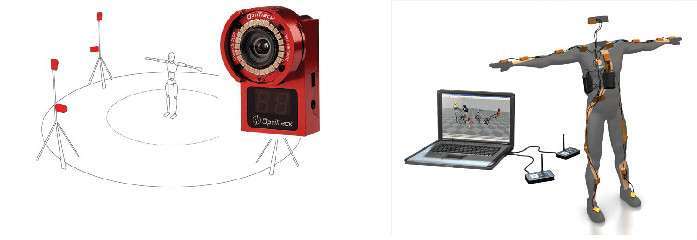
When it comes to setup, Xsens is all about mobility and ease. You wear a full-body suit or attach small IMU sensors directly to your body. There are no cameras or markers, just a compact system you can set up in minutes. It’s ideal if you work in tight spaces or need to capture motion on the go.

OptiTrack, on the other hand, uses multiple infrared cameras and reflective markers to track movement in a studio space. You’ll need to set up cameras around a capture area, place markers on a suit, and calibrate the system before recording. It takes longer to prepare, but offers high accuracy, especially in controlled environments.
>>> Read more: What Is the Most Accurate Mocap? Top Systems Ranked
Summary:
- Choose Xsens for a fast, portable setup.
- Go with OptiTrack if you have a studio and want more precise, large-scale tracking.
Xsens and OptiTrack Accuracy/Data Quality
Xsens offers solid accuracy for full-body motion, especially in dynamic movements like running or jumping. Since it uses inertial sensors, you won’t face occlusion issues, and you can record anywhere. However, it can experience “drift” over time, where positional data slowly becomes less accurate, especially in environments with magnetic interference. Newer models help reduce this.
OptiTrack delivers top-tier precision using infrared cameras and markers. It captures detailed motion with sub-millimeter accuracy, making it ideal for studio use, biomechanics, and high-end animation. But it depends heavily on line-of-sight—if a camera loses view of a marker (due to occlusion), data can be disrupted. The setup must also be carefully calibrated.
Summary:
- Use Xsens if you need portable, flexible mocap.
- Use OptiTrack for ultra-precise, studio-based capture.
Xsens and OptiTrack Software/Ecosystem
Xsens uses MVN Animate, a user-friendly tool designed for quick setup and real-time motion capture. You can stream data directly to engines like Unreal and Unity, or export to formats like FBX and BVH for use in Maya, Blender, and more. It’s ideal for mobile setups, live performance capture, and virtual production. Xsens also supports cloud collaboration and integrates well with face and finger tracking add-ons.

OptiTrack runs on Motive, a powerful but more technical software made for studio environments. It offers precise control over camera calibration, marker tracking, and multi-actor sessions. While it has a steeper learning curve, it’s extremely customizable and works well in complex motion capture pipelines. Motive integrates with animation tools, game engines, and systems like OpenVR or virtual camera rigs.
Summary:
- Xsens is faster and easier to use.
- OptiTrack offers more control for advanced users.
Xsens and OptiTrack Motion Capture Types & Use Cases
Xsens is perfect if you need flexibility. Since it doesn’t rely on cameras, you can capture motion almost anywhere, indoors, outdoors, or in tight spaces. It’s a go-to for game developers, virtual production teams, VR/AR projects, and sports science professionals who need portable, fast mocap.
OptiTrack, on the other hand, excels in studio environments. Its precision and multi-camera setup make it ideal for high-end film, AAA game development, and biomechanics research where every movement detail matters. If you’re tracking multiple actors or doing face and finger capture, OptiTrack handles complex setups well.
Summary:
- Use Xsens when you want portability and speed.
- Use OptiTrack for detailed, studio-based motion tracking.
Xsens and OptiTrack Pricing & Scalability
Xsens offers an all-in-one mocap solution with suits, sensors, and software bundled together. While it’s simple to purchase and set up, the cost is fairly high; full-body packages typically range from $12,000 to $18,000, depending on the version and license. It’s ideal for solo creators or small teams, but less scalable for multi-actor setups.

OptiTrack uses a modular pricing model. You can start small with a few cameras and expand as needed, making it more flexible but potentially more expensive in the long run. Entry-level systems may cost $8,000 to $10,000, while full studio setups can exceed $50,000. It’s a better fit if you plan to scale or need to capture multiple performers and large spaces.
Summary:
- Xsens = simpler but limited scaling
- OptiTrack = more scalable but complex and costly as it grows
FAQs
Can I use Xsens and OptiTrack together?
Yes, you can. Some studios use Xsens for rough outdoor or mobile captures, then refine or reshoot key scenes with OptiTrack in a studio for higher precision. They can also be synced using third-party tools for hybrid workflows.
Is Xsens good for facial or finger capture?
By itself, Xsens handles body motion only. But it can be combined with third-party solutions like Manus gloves for finger tracking or iPhone-based facial capture (like Faceware or ARKit).
Can I use OptiTrack outdoors?
Not really. OptiTrack relies on cameras and reflective markers, which don’t work well in uncontrolled lighting or open environments. It’s built for indoor use where you can control light and camera setup.
Which one is easier for beginners?
Xsens. It’s plug-and-play, easy to wear, and doesn’t need camera calibration. OptiTrack is more technical and suited for studios with trained operators.
Which system is better for live streaming into Unreal or Unity?
Xsens is the better choice here. It supports real-time streaming directly into Unreal Engine and Unity with minimal setup. OptiTrack can do it too, but it takes more configuration and hardware syncing.
How many people can each system track at once?
Xsens is mostly used for single-performer setups, though multi-actor support is possible with multiple suits (at added cost). OptiTrack is much more scalable; you can track multiple performers and props simultaneously in a studio.
Do either systems need internet to work?
Nope! Both Xsens and OptiTrack work offline. You only need internet for things like software updates, cloud storage, or remote collaboration, not for basic motion capture sessions.
Wrap Up
Xsens and OptiTrack both offer great motion capture, but for different needs. Xsens is portable, easy to set up, and perfect for on-the-go or real-time projects. OptiTrack provides high-precision tracking in studio environments, ideal for film, AAA games, or complex multi-actor scenes. Your choice depends on your workspace, accuracy needs, and budget. Pick the one that fits your workflow and project goals best.
–
Animost – Vietnam 3D Animation Studio


hello@animost.com

More from the stage
Sep 15, 2026Behind the Scenes of HOPE Na Hong-jin Sci-Fi Action with Motion Capture
If you love wild action movies, high-stakes science fiction, and cinema that keeps your heart pounding, South Korean filmmaker Na Hong-jin’s latest project, HOPE, needs to…
Do I Own the Copyright to AI-Generated Animation?
Do you own the copyright to AI-generated animation? Learn how AI, human creativity, and platform rules affect ownership and commercial rights.
Start a project
Tell us what you need made.
Send us the details and we will come back within one business day with a scope and a price.
Start a project