Next-Level AI Facial Mocap: The Ultimate Guide to Reallusion AccuFACE 2
When Reallusion released the original AccuFACE plugin for iClone, it changed the game by offering simple, webcam-based AI facial tracking without the bulky gear.
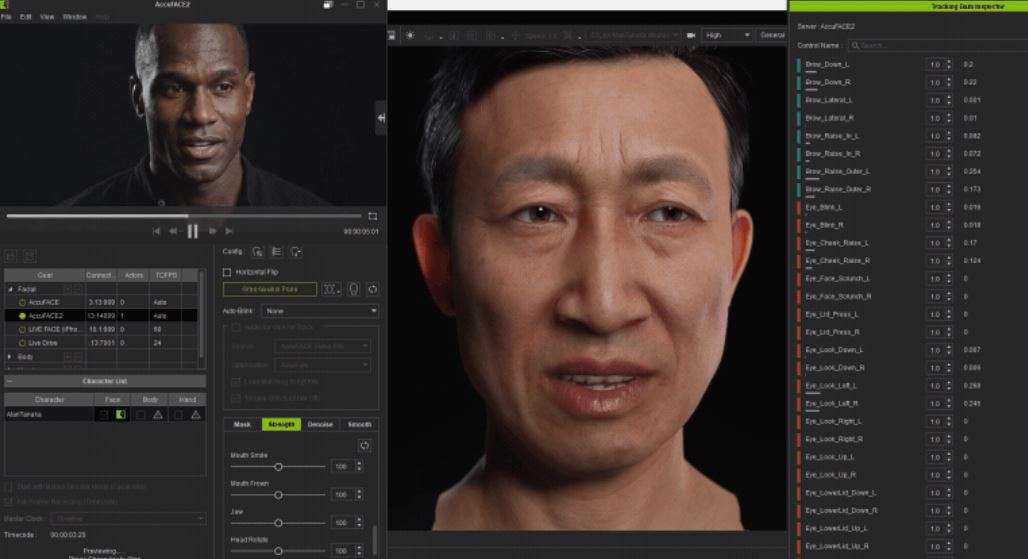
Now, AccuFACE 2 sets a whole new benchmark for real-time performance capture. Built specifically to drive Character Creator 5 (CC5) HD avatars, powered by GPU acceleration, and equipped with smart lighting algorithms, AccuFACE 2 turns ordinary webcams or video clips into cinema-grade motion capture rigs.
What is AccuFACE 2?
AccuFACE 2 is an AI-powered facial motion capture plugin created by Reallusion for iClone. It tracks your facial movements (eyebrows, eyes, cheeks, jaw, and lips) via a live camera or pre-recorded video feed and maps those actions directly onto 3D characters in real time.
| [Camera / Video Input] -> [AccuFACE 2 AI Engine] -> [iClone / CC5 Character] |
Where traditional motion capture tools rely on flat, linear math or expensive depth sensors, AccuFACE 2 uses a newly trained deep-learning model designed to recognize fine facial geometry under messy, real-world conditions.
Read more: Behind the Scenes of HOPE Na Hong-jin Sci-Fi Action with Motion Capture
Key Features at a Glance
| Feature | What It Does | Why It Matters for Animators |
| GPU Acceleration | Offloads all facial tracking calculations to your graphics card. | Keeps your CPU free, ensuring lag-free viewports and low latency. |
| CC5 HD Profile | Connects directly to CC5’s native 262 blendshapes and 128 corrective morphs. | Captures micro-expressions, tiny mouth twitches, and clean lip sync. |
| Expression Curves | Allows custom non-linear curves, signal linking, and timing tweaks. | Enables snappy cartoon exaggeration or subtle anatomical follow-through. |
| Adaptive Vision | Auto-adjusts for low light, harsh shadows, dynamic movement, and varied skin tones. | Lets you capture clean animation anywhere, no pro lighting or calibration required. |
| Single-Source Body & Face | Tracks small faces (down to $120 \times 120$ pixels) from mid-shots. | Drives both full-body motion and facial expressions from one single video. |
| Cross-Platform Pipeline | Exports clean motion data directly to Unreal Engine, Blender, Maya, and Cinema 4D. | Integrates smoothly into any production pipeline, including MetaHuman workflows. |
GPU Acceleration: The High-Performance Engine
Facial tracking requires processing high-resolution video frames instantly. Older CPU-bound tracking software often caused viewport lag, dropped frame rates, or system crashes when running alongside heavy 3D scenes.
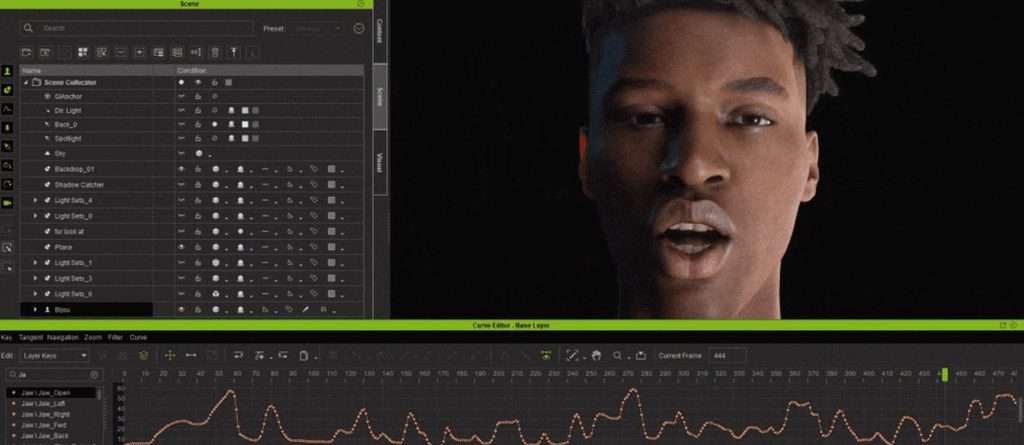
By shifting the tracking workload to your graphics card (supporting both NVIDIA and AMD GPUs), AccuFACE 2 achieves ultra-low latency. Your CPU stays free to handle physics, character rigs, and scene rendering, giving you real-time feedback in your iClone viewport even with complex, highly detailed character models.
AccuFACE 2 x CC5 HD Characters: Precision Performance
AccuFACE 2 was specifically built to tap into the high-definition architecture of Character Creator 5 (CC5).
CC5 characters feature a refined facial mesh driven by:
- 262 Native Blendshapes for comprehensive facial movement.
- 128 Corrective Morphs that prevent mesh collapsing around complex expressions.
Detailed Lip Sync and Talking Performances
Capturing natural speech is one of the hardest problems in 3D animation. Synthetic lip movements often end up looking robot-like or disconnected from actual speech sounds.
AccuFACE 2 introduces dedicated mouth-tracking optimization. The tracking model isolates subtle mouth dynamics, such as lip puckers, micro-adjustments during fast speech, tongue movements, and subtle jaw shifts, mapping them to the underlying CC5 mesh. This produces clean, believable lip sync across any spoken language without requiring hours of manual phoneme editing.
| [Actor Spoken Words] -> [Specialized Mouth Model] -> [128 Lip Morphs] -> [Natural Lip Sync] |
Full Emotional Range
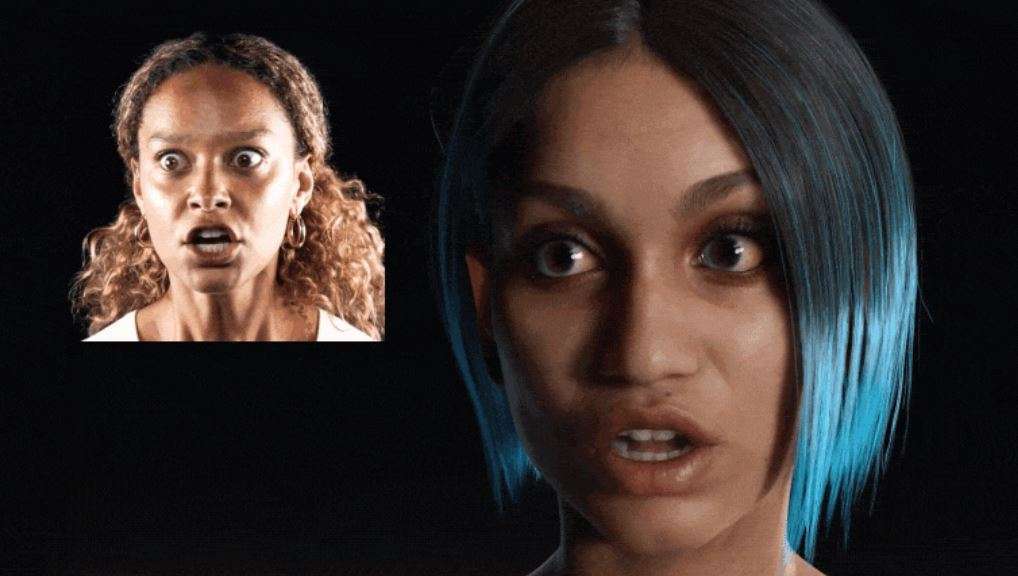
Beyond speech, the updated AI model captures the full spectrum of human emotion. From tiny eyebrow twitches, subtle squints, and natural eye-gaze tracking to wide-mouthed shouts and exaggerated facial expressions, the motion translates cleanly onto both photorealistic digital humans and stylized fantasy avatars.
Total Creative Control with Expression Curves
Raw motion capture data is rarely “ready-to-use” straight out of the box. Cartoons need snappy exaggeration, while realistic digital humans need soft anatomical follow-through.
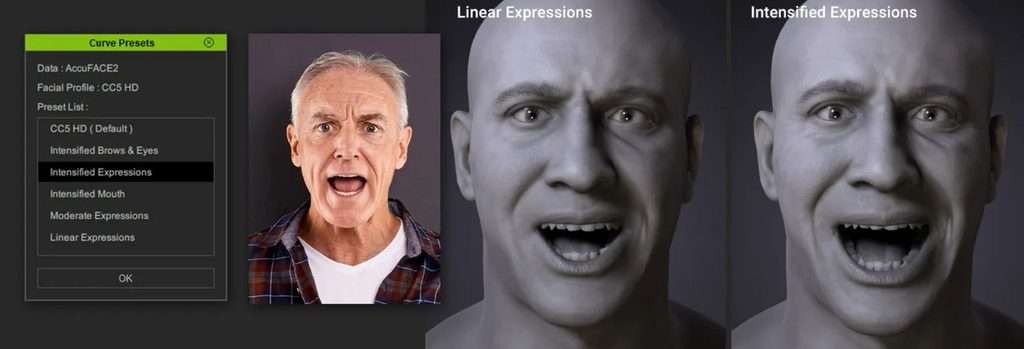
Traditional tracking tools map movement linearly: if your eyebrow moves 5 millimeters, the 3D eyebrow moves 5 millimeters. AccuFACE 2 breaks away from rigid linear tracking with its built-in Expression Curves System.
- Non-Linear Signal & Custom Timing
Animators can reshape how raw movement signals translate into 3D motion. By adjusting non-linear response curves, you can add explosive snap to cartoon facial takes or damp down unwanted nervous twitches on a photorealistic character.
- Exaggeration and Follow-Through
You can link a single tracking input to drive multiple secondary morphs automatically. For instance, tracking an upward eyebrow movement can simultaneously drive subtle forehead wrinkle morphs, creating anatomical realism for realistic characters or bold expression pops for stylized characters.
- Built-in Curve Presets
Not keen on tweaking individual mathematical curves for hours? AccuFACE 2 includes a library of curve presets tailored for specific facial zones (eyes, mouth, brows) and performance intensities. With a single click, you can adjust the rhythm, tempo, and style of your performance.
Live Video Reference and Recording
AccuFACE 2 lets you record live video feeds directly within the plugin interface. This allows you to load reference footage side-by-side with your 3D animation, making manual cleanup and fine-tuning fast and intuitive.
This live video recording functionality extends to the LIVE FACE mobile app, allowing smartphone camera setups to sync seamlessly with your iClone workspace.
Built for Real-World Shooting Environments
Real-world production environments rarely offer perfect studio conditions. Most creators record in bedrooms, home offices, or cramped workspaces with simple webcams and uneven desk lights.
AccuFACE 2 uses adaptive algorithms designed to maintain steady tracking under sub-optimal capture conditions without requiring rigid neutral-pose calibrations or specialized helmet rigs.
- Poor or Changing Lighting
Built-in auto-gamma correction handles underexposed rooms, dim environments, blown-out overhead lighting, and strong directional shadows. The tracking engine compensates for light variations automatically to keep facial landmarks visible.
- Extreme Head Rotation and Pitch
With traditional facial capture plugins, sharp head turns or aggressive profile angles cause tracking features to warp or lock up completely. AccuFACE 2 tracks reliably through fast head rolls, steep pitches, and sharp side profile turns, keeping facial expressions stable without sudden popping or freezing.
- Broad Skin Tone Adaptability
Harsh lighting contrast or subtle visual boundaries can cause feature drift on various skin complexions. AccuFACE 2 uses adaptive visual recognition to identify facial structures across all skin tones, delivering drift-free, reliable tracking.
Unified Full-Body and Facial Mocap from One Single Video Source
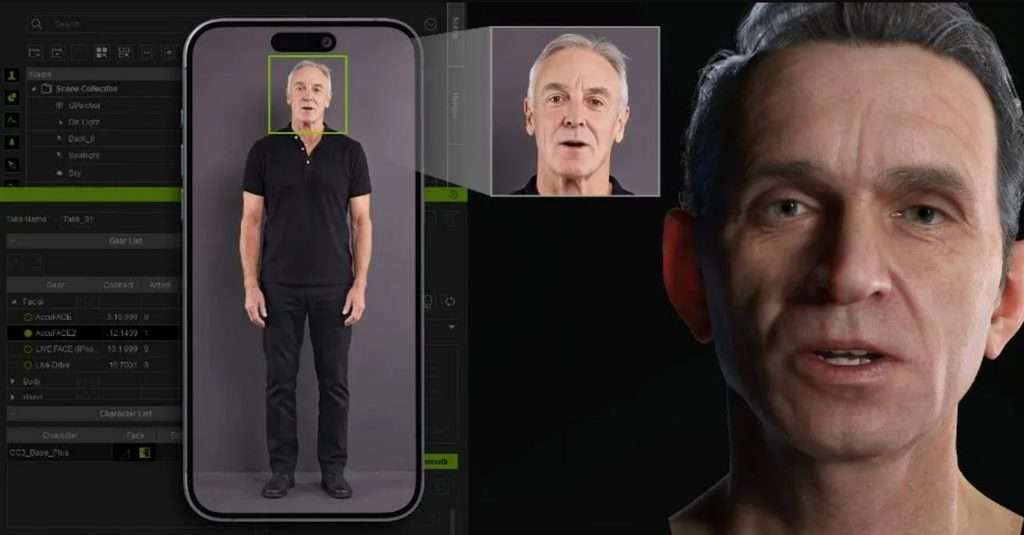
One of the biggest hurdles for solo animators is capturing body motion and facial expressions at the same time. Typically, facial capture requires a close-up camera shot on your face, while body mocap requires a wide-shot camera viewing your full frame.
AccuFACE 2 solves this problem with Long-Distance and Blur-Resilient Tracking.
The AI tracking model isolates and tracks facial features even when the performer’s face occupies a small area of the video frame, down to $120 \times 120$ pixels.
What This Means for Solo Creators:
- Single Video Source: You can set up one smartphone or webcam to capture your entire performance.
- Synchronized Output: Process facial expressions through AccuFACE 2 and upper-body movements through iClone Video Mocap simultaneously from the same feed.
- Resilient to Blur: Advanced tracking algorithms recover expressions despite rapid body movements or motion blur.
Pro Tip: While AccuFACE 2 reliably tracks facial expressions from wider shots, framing your camera closer to the performer’s face remains best practice for capturing subtle micro-expressions and intricate lip movements.
Cross-Platform Pipeline Integration
iClone serves as an ideal central hub for capturing, polishing, and retargeting facial animation data. Once you have recorded and refined your performance in iClone, you can export clean motion data to virtually any industry-standard 3D engine or software.
AccuFACE 2 offers direct compatibility with Unreal Engine’s MetaHuman Animator (MHA) via Auto Setup.
- Facial performances captured on CC5 characters map directly onto MetaHuman rigs.
- MHA motion sequences can be brought back into iClone for further editing, curve adjustments, and blending.
How to Get Started with AccuFACE 2
Reallusion offers flexible entry points for both returning users and new animators testing the pipeline for the first time.
Step-by-Step Setup Guide
Step 1. Download and Install iClone:Requires iClone v8.74 or higher.
Install iClone through the Reallusion Hub. New users can download iClone Personal for free without time restrictions to test out the software environment.
Step 2. Install the AccuFACE 2 Plugin:Accessible via Motion LIVE.
Download the AccuFACE 2 plugin. Once installed, launch iClone and open the Motion LIVE panel under the Plugins menu.
Step 3. Configure Your Video Input Source:Webcam, Smartphone, or Video File.
Connect your USB webcam, link your mobile device using the LIVE FACE app, or import a pre-recorded video clip directly into the AccuFACE 2 panel.
Step 4. Set Neutral Pose and Fine-Tune Curves:No complex multi-step calibration required.
Have your performer face the camera and set a neutral expression. Use the Expression Curves System or load curve presets to match the art style of your target CC5 character.
Step 5.Record and Export Animation Data:Seamless pipeline integration.
Hit record, perform your scene, and edit the captured motion tracks directly on the iClone timeline. Export the final animation to FBX, Unreal Engine, Blender, or Maya.
Free Bonus: Ultra Head Scans – Meg
Both trial users and full license holders receive Ultra Head Scans – Meg (a $\$79$ value) as a free bonus download.
You can find Meg in your Reallusion Content Manager under the Free Resource or Trial folder. She serves as an ideal high-detail benchmark character for testing CC5 HD facial tracking, blendshape responses, and lip sync precision right out of the box.
Frequently Asked Questions (FAQ)
Do I need an expensive head-mounted camera rig to use AccuFACE 2?
No. AccuFACE 2 is engineered to work with standard everyday webcams, smartphones, and pre-recorded video files. Its adaptive lighting and tilt-tracking algorithms eliminate the need for head rigs or fixed studio setups.
Can I drive facial mocap and body mocap at the same time?
Yes! Because AccuFACE 2 can isolate facial features from small frame sizes ($120 \times 120$ pixels), you can position a single camera far enough back to track upper-body movement with iClone Video Mocap while capturing facial expressions simultaneously.
How does AccuFACE 2 handle non-realistic or cartoon characters?
AccuFACE 2 features an Expression Curves System with customizable non-linear curve mappings and built-in presets. You can boost sensitivity, add secondary follow-through motion, and introduce snappy exaggeration to match stylized or cartoon art styles effortlessly.
Final Thoughts: Is AccuFACE 2 Worth It?
For 3D animators, indie game developers, and digital storytellers, AccuFACE 2 removes the technical friction from facial motion capture. By pairing GPU-accelerated performance with native support for CC5 HD characters and smart adaptive vision, Reallusion has delivered a tool that produces clean, high-fidelity facial animation under everyday studio conditions.
Ready to elevate your character animation workflow? Try out the AccuFACE 2 Free Trial alongside iClone to test the full real-time capture pipeline on your own characters today.
Source: beforeandafter

More from the stage
Aug 31, 2026Remembering Tim Curry: Celebrating the Unforgettable Legacy of a True Acting Legend
Legendary actor Tim Curry passed away at age 80. Explore his incredible life, iconic movie characters, and legendary voice-acting roles.
Remembering Peter Cullen: The Legendary Voice of Optimus Prime & Eeyore Passes Away at 85
Legendary voice actor Peter Cullen has passed away at 85. Explore his incredible life, from voicing Optimus Prime and Eeyore to his Hollywood career.
Start a project
Tell us what you need made.
Send us the details and we will come back within one business day with a scope and a price.
Start a project