Discovering Motion Capture Facilities: A Full Guide for Creators, Studios & Devs
Welcome to the exciting world of motion capture! Whether you’re working on a blockbuster movie, a video game, or a passion project in animation, there’s one thing we all need to bring characters to life: great motion capture facilities. And that’s what we’re diving into today.
We’ve seen mocap evolve from ping-pong balls on leotards to full-blown real-time performance capture that powers today’s most stunning visuals. But behind every jaw-dropping digital performance is a facility equipped with high-end gear, smart technicians, and a creative atmosphere.
In this guide, we’re going to explore what makes a great motion capture facility, what services you can expect, the tech involved, pricing insights, and where to find top studios (especially if you’re working in or looking toward Asia). Let’s get into it.
What Is a Motion Capture Facility?
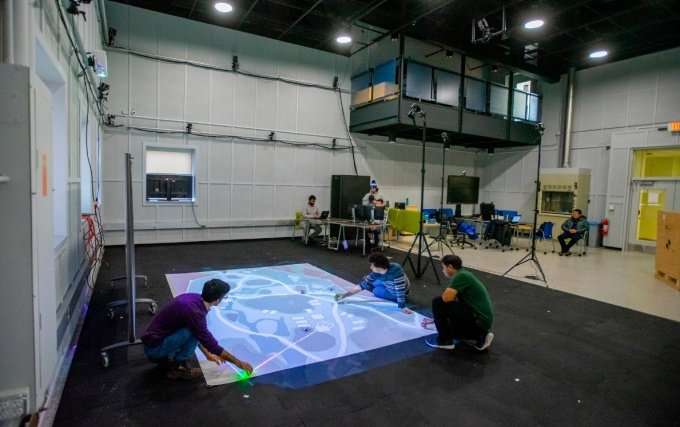
Let’s start simple. A motion capture facility is a specialized studio space designed to record human movement and translate it into digital data. That data gets used in film, games, VR/AR experiences, commercials, even medical simulations and biomechanics studies.

It’s not just about the room, though that’s important. It’s about the entire environment: the cameras, the software, the lighting, the suits, and the people who know how to make the magic happen.
>>> Read more: Pros and Cons of Motion capture? The development of Motion capture Asia
Why Motion Capture Facilities Matter
Sure, you can technically buy a mocap suit and try recording in your garage, but if you’re aiming for high fidelity, studio-level results, or full-body + facial tracking, that’s where professional motion capture facilities shine.
Here’s why you should consider a mocap facility:
- Accuracy: Studios are equipped with high-end systems (like OptiTrack, Vicon, or Xsens) that provide millimeter-level precision.
- Space: Facilities often provide large volumes for full-body and multi-actor scenes.
- Support Crew: You get technicians, directors, and animators who know the workflow.
- Speed: With the right setup, mocap studios allow real-time previews, even full previsualization with environments loaded.
- Clean Data: Less time fixing noisy captures = faster production cycles.
What Services Do Motion Capture Facilities Offer?
You’ll find that most full-service motion capture facilities offer more than just capturing motion. Depending on the studio, you might get:
Body Motion Capture (Full-Body Tracking)
This is the bread and butter of motion capture. It’s all about capturing how your actors or performers move (walking, running, jumping, dancing, sword fighting, or just casually leaning against a wall).

How It Works:
- Optical Systems: These use reflective markers on a tight-fitting suit (usually a black spandex-style bodysuit). Dozens of infrared cameras around the studio track those markers in 3D space.
- Inertial Systems: These skip the cameras. Instead, they use IMUs (inertial measurement units), little sensors strapped to joints, to track motion. Xsens and Rokoko are big players here.
What It’s Good For:
- Action scenes
- Game animations
- Stunt choreography
- Dance sequences
- Realistic character animations in 3D/VR
What to Watch Out For:
- Marker occlusion in optical setups (when one marker hides behind another)
- Sensor drift in inertial setups (when the sensors slowly lose accuracy without recalibration)
Great motion capture facilities often combine optical and inertial to reduce these issues. Some even use hybrid systems for the best of both worlds.
>>> Read more: The Future of Animation Technology: Motion Capture AI
Facial Motion Capture (Face Tracking)
If full-body mocap is the skeleton, facial capture is the soul. It’s what makes your characters feel alive, not just move realistically.
How It Works:
- Actors wear a head-mounted camera rig that tracks facial movements using markers placed on key muscles (like eyebrows, cheekbones, lips).
- Or, in markerless systems, high-res cameras capture facial data directly (e.g., Apple ARKit-style setups).
- Software like Faceware, Dynamixyz, or Live Link Face processes this footage into motion data.
What It Captures:
- Eye blinks, eyebrow movement
- Lip syncing to dialogue
- Emotion (smiles, frowns, surprise, rage, all of it)
Ideal For:
- Cinematics and cutscenes in games
- Dialogue-heavy films or animation
VR avatars that mirror the user’s expression - Creating digital doubles of actors
Pro Tips:
- Good lighting is crucial. Facial mocap is sensitive to shadows.
- High-resolution rigs capture more emotion, but also cost more.
- Syncing with audio in real time helps nail the performance.
Some studios even offer AI-enhanced facial cleanup now, which removes jitters and enhances subtle motion.
>>>Read more: FX and animation studios increasing favor for virtual production and workstations
Hand & Finger Capture
When you want characters to pick up a glass, press a button, or play the piano, you can’t skip this. Hands are complicated. And animating them by hand? Painful.
How It Works:
- Most studios use data gloves like Manus Prime, StretchSense, or SenseGlove.
- These gloves contain sensors (usually flex sensors or IMUs) that detect finger curls, wrist orientation, and hand movement in real time.
What It Captures:
- Individual finger bends
- Gestures and poses
- Interaction with props (grabbing, throwing, squeezing)
Who Uses It:
- AAA game studios (think Call of Duty, Assassin’s Creed)
- Virtual production for film
- Robotics/VR interaction design
- Product demos or medical training apps
In higher-end setups, gloves are synced with full-body and facial mocap systems. That’s when you unlock true performance capture.
>>> Read more: Real time Virtual Production using Unreal Engine
Performance Capture (The Full Combo: Body + Face + Voice)
Performance capture is the gold standard: the full-package deal. You’re capturing the entire performance from a human actor: how they move, how they talk, how they emote, all at once.\

How It Works:
- The actor wears a body suit, gloves, and a facial rig, plus a microphone to capture voice.
- The studio syncs all data streams: motion, face, hands, and audio.
- Many motion capture facilities stream this data live into Unreal Engine or other 3D software for real-time review.
Real Examples:
- Andy Serkis as Gollum in Lord of the Rings
- Ellie and Joel in The Last of Us Part II
- James Cameron’s Avatar characters
Use Cases:
- Cinematic storytelling in games and films
- Dialogue-driven animation
- Emotionally performance-driven digital actors
- XR and metaverse avatar design
Considerations:
- Requires highly skilled actors (stage or theater-trained is a plus)
- You’ll need rehearsal time and direction
- Best done in studios with solid camera calibration and real-time monitoring
Performance capture is a powerful tool, but it’s also the most demanding in terms of tech and talent. Make sure your facility has a track record here.
Virtual Production (Mixing Mocap with Digital Sets in Real Time)
Virtual production lets you direct a digital scene as if you were shooting it on a real set only it exists entirely in a game engine like Unreal.
How It Works:
- Mocap actors perform in a volume (a tracked studio space).
- Cameras and props are tracked too.
- Everything is piped into a real-time engine (usually Unreal Engine) where 3D environments, lighting, and effects are added live.
- You can move virtual cameras, add set dressing, and even record the scene as if it were filmed on location.
You’ve Seen This In:
- The Mandalorian (combined LED walls and virtual sets)
- Avatar: The Way of Water
- Interactive commercials and immersive XR projects
Benefits:
- You save on location costs
- You get immediate feedback on framing, lighting, and motion
- It speeds up the creative process by letting directors “see” the final product on the spot
This is where motion capture goes from just data collection to being a real-time creative playground.
Previs & Real-Time Visualization
Previs (short for previsualization) is all about blocking out your scenes before you animate or render them in full. It’s quick, dirty, and extremely helpful.
How It Works:
- Motion capture data is piped into a simplified version of your 3D scene (e.g., with greyboxes or placeholder characters).
- Directors and animators can move virtual cameras, try different angles, and time actions like cuts or jumps.
- Often done with real-time rendering engines so you can see the performance unfold right away.
Why It’s Useful:
- You can iterate fast
- It helps producers and directors plan camera movement
- Actors understand how their performance will fit the final world
- Saves tons of time later during animation and editing
Studios that offer real-time previs tools (like virtual cameras, VR scouting, or Unreal Engine live previews) help speed up the feedback loop, and that’s priceless in fast-moving productions.

Post-Processing & Clean-Up (Retargeting, Filtering, Polishing)
This is the unsung hero of motion capture. You’ve captured your movement, but it’s not plug-and-play just yet.
What It Involves:
- Retargeting: Mapping mocap data onto your 3D character rig (because no two skeletons are exactly alike).
- Filtering: Removing jitters, foot sliding, and noisy data.
- Cleanup: Fixing marker swaps, misreads, or lost frames.
- Animation polish: Artists hand-tweak movements for extra realism or style.
Tools Used:
- MotionBuilder, Blender, Maya
- HumanIK and custom rigging scripts
- AI-assisted tools like DeepMotion or RADiCAL for cleanup acceleration
Why It Matters:
Even the best mocap session can generate weird artifacts:
- Feet floating above ground
- Hands intersecting the body
- Arms popping out of sockets
Studios that offer solid cleanup pipelines make a huge difference, especially if you’re working on high-end cinematics, trailers, or final in-game animation.
Inside the Studio: What Equipment Will You Find?
When you step into a mocap facility, here’s what usually surrounds you:
| Equipment/Tech | Purpose |
| Optical Cameras (Vicon, OptiTrack) | High-speed tracking with reflective markers on suits. |
| Inertial Suits (Xsens, Rokoko) | Motion tracking via sensors, no cameras required. |
| Facial Capture Rigs (Dynamixyz, Faceware) | Records micro expressions and lip sync. |
| Gloves (Manus, StretchSense) | Tracks hand and finger movements. |
| Virtual Cameras | Used in virtual production setups. |
| Software (Shōgun, MVN Animate, Unreal Engine) | Controls everything and lets you see things in real-time. |
Some studios go even further with treadmill rigs, volumetric capture setups, or even drone-integrated systems. It depends on the scope of work.
What Makes a Great Motion Capture Facility?
Not all studios are created equal. Here’s what you should look for when evaluating a mocap facility:
- Technology Stack: Are they using modern, well-maintained equipment? Can they handle full performance capture or just body?
- Team Experience: The crew matters. From the capture director to the cleanup animators, experience = smoother sessions.
- Studio Size: Is it a tight box, or can it accommodate multiple actors and stunts?
- Post-Capture Services: Do they provide data clean-up, retargeting, or even animation polishing?
- Client Portfolio: Have they worked with film/game studios you recognize? Real credits show reliability.
- Pricing Transparency: Studios that list ballpark pricing or offer custom quotes are much easier to work with than those hiding costs behind vague consultations.
Motion Capture Facility Rates: What Should You Expect?
Now, the money talk.
Motion capture isn’t cheap, but it’s not out of reach either, especially if you know where to look. Rates can vary based on location, services, and duration.
| Region | Day Rate (Basic Setup) | Performance Capture | Notes |
| North America | $2,000 – $5,000 | $5,000 – $10,000 | Top-tier studios cost more |
| Europe | $1,500 – $4,500 | $4,000 – $9,000 | The UK and France lead here |
| Asia (e.g., Vietnam, India) | $1,000 – $3,500 | $2,500 – $6,000 | Great value, rising industry |
| Freelance/Indie Studios | $500 – $1,500 | Variable | Often using Xsens or Rokoko |
Prices often include the space, gear, and technician support. But cleanup, retargeting, or extra talent (like stunt actors) may cost more.
Spotlight: Motion Capture Facilities in Asia
If you’re looking to stretch your budget without compromising on quality, Asia is booming with new and capable mocap studios. Countries like Vietnam, India, Korea, and the Philippines are becoming serious players in animation and VFX, and mocap is a part of that.
Why Consider Asia?
- Lower overhead = lower prices
- Skilled technicians and artists
- English-speaking support in many regions
- Access to remote/live capture services
Here’s a quick look at some of the most well-known and reliable motion capture facilities across Asia:
| Studio | Location | Known For |
| Animost Studio | Vietnam | Full-body & facial mocap, Unreal pipeline, remote-ready |
| Pixelman | South Korea | Game-centric capture with real-time visualization |
| Makuta VFX | India | Mocap for Bollywood, ads, and digital doubles |
| Studio Ark | Philippines | Affordable indie-friendly setup |
How to Choose the Right Mocap Facility for Your Project
So you’re ready to dive in, how do you pick a studio? Here’s a quick checklist:
- Do they offer the type of capture you need? (Body, face, hands?)
- Can they deliver data in the format you want? (FBX, Unreal-ready?)
- Are they available on your timeline?
- Do they have experience with your type of project?
- Are they within your budget?
- Can they support remote or hybrid capture workflows?
You’ll also want to request a sample reel, ask for a quote, and, if possible, tour the space virtually or in person.

Remote Motion Capture: A Growing Trend
More mocap studios now offer remote or hybrid capture, where you either send actors to a local partner studio or rent a home mocap setup (like Xsens or Rokoko) and stream the data to the facility for cleanup.
This is a game-changer if you’re working internationally or don’t have easy access to large studios. Motion capture facilities like Animost in Vietnam, for example, are already set up to direct, receive, and process remote mocap shoots, making international collaboration feel pretty seamless.
Mistakes to Avoid When Booking a Mocap Studio
Before you sign any contracts, here are a few red flags or common mistakes to watch out for:
- Not discussing deliverables upfront (What format? What cleanup?)
- Booking too little time (Always pad extra time for setup and retakes)
- Skipping a test shoot (A quick test can save hours later)
- Assuming everything is included (Always clarify what’s in the quote)
- Choosing on price alone (Experience and tech matter more than saving a few hundred)
Future of Motion Capture Facilities : Real-Time, AI & More
Motion capture facilities are evolving fast. Here’s what’s coming:
- More Real-Time Pipelines: Thanks to Unreal Engine and Unity, you can see results instantly.
- AI-Assisted Mocap Cleanup: Tools like RADiCAL and DeepMotion are getting smarter at cleaning up or even generating mocap.
- Cloud Collaboration: Full-scale remote projects with cloud processing are already happening.
- Virtual Production: LED walls, mocap, and live rendering are merging into one giant creative playground.
Facilities that adapt to this hybrid world (fast, flexible, affordable) will continue to lead.
Final Thoughts: Let’s Wrap It Up
Whether you’re building a game, directing a cinematic, or developing immersive experiences, a professional motion capture facility can massively elevate your project. From clean data to cinematic storytelling, the right studio doesn’t just capture movement; it helps bring your vision to life.
And the good news? You don’t have to be a giant studio to access great mocap. With the rise of Asian studios like Animost, remote capture pipelines, and more affordable tech, motion capture is more accessible than ever.
So go ahead, explore your options, ask questions, and don’t be afraid to experiment. The right facility is out there, ready to help you bring digital characters to life with real emotion, movement, and soul.
–
Animost – Vietnam 3D Animation Studio


hello@animost.com

More from the stage
Sep 23, 2026Next-Level AI Facial Mocap: The Ultimate Guide to Reallusion AccuFACE 2
When Reallusion released the original AccuFACE plugin for iClone, it changed the game by offering simple, webcam-based AI facial tracking without the bulky gear. Now, AccuFACE…
Remembering Tim Curry: Celebrating the Unforgettable Legacy of a True Acting Legend
Legendary actor Tim Curry passed away at age 80. Explore his incredible life, iconic movie characters, and legendary voice-acting roles.
Start a project
Tell us what you need made.
Send us the details and we will come back within one business day with a scope and a price.
Start a project